In this article
Tally promises unlimited forms and unlimited submissions for free. No catch screen, no credit card.
That claim is unusual enough to be worth checking line by line, because “free” is where most form builders start the upsell, not end it.
What Is Tally and What Does It Actually Include Free?
Tally is a form builder that works like a text document. You type your questions, insert blocks the way you would in Notion, and publish a shareable link. No drag-and-drop canvas, no account required to try it.
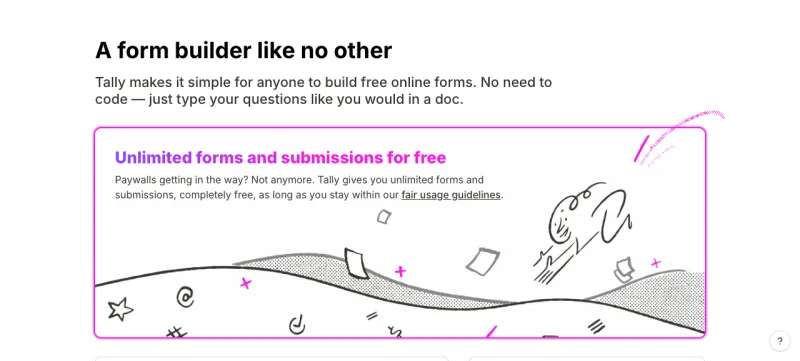
Tally is a free, no-code form builder that works like a typing-first document editor. Its free plan includes unlimited forms, unlimited submissions, payment collection, conditional logic, and file uploads, within a published fair-use policy, per Tally’s pricing page (fetched October 2026).
That is a wider free feature set than most competitors print. Typeform’s pricing page caps its free plan at 10 responses a month across all forms, and its cheapest paid tier, Basic, includes 100 responses a month. The comparison table on that page shows $29 a month on monthly billing and $25 a month on yearly billing, while another block on the same page shows $39 monthly and $28 yearly, so check the checkout price before you rely on either (fetched 16 November 2026). Jotform’s pricing page caps its free Starter plan at 100 submissions a month (fetched September 2026). Tally’s pitch is that none of that matters here, because its free limit is a fair-use policy, not a number.
For a solopreneur running a validation survey, that distinction changes the decision. You are not choosing a form program for the next 12 months. You need 20 to 50 honest answers from people who match your target customer, then you read the pattern and move on. A tool that caps you at month one is a worse fit than one that does not, even if the paid version eventually looks similar.
What’s Included on Tally’s Free Plan?
The free plan is not a stripped demo. Per Tally’s own feature list, it includes conditional logic and calculations, payment collection, e-signatures, file uploads, password-protected forms, answer piping, 45+ languages with RTL support, and native integrations with Google Sheets, Notion, Airtable, Zapier, Make, and webhooks.
Tally’s free plan includes payment collection, conditional logic, e-signatures, and file uploads with no response ceiling, as long as usage stays within Tally’s fair-use guidelines. Uploads are capped at 10 MB per file on free.
That payment field matters more than it looks. If your validation test includes a pre-sale question, “would you actually pay $29 to reserve a spot,” you can collect that payment inside the same form instead of stitching together a survey tool and a separate checkout link. Typeform’s pricing FAQ lists payment and file-upload questions among the features that need a paid plan.
Tally is based in the EU and stores form data in Europe, encrypted both in transit and at rest, per the same pricing page. For a founder evaluating a privacy-sensitive or EU-facing idea, that is a specific, checkable claim rather than a generic “we take security seriously” line.
What Does Tally Hide Behind the Pro Plan?
Three things sit behind Pro, and they matter in a specific order depending on what your survey needs.
Tally’s Pro plan is listed at $24 a month (the page does not label the billing term next to that figure) and removes Tally branding, adds custom domains, and unlocks partial submissions, which capture answers from people who started your form but never clicked submit, per Tally’s pricing page (fetched October 2026). The page has a monthly/yearly toggle with “2 months off” for yearly, so $24 is most likely the yearly-billed rate.
Partial submissions are the one free-tier gap that actually costs you data, not polish. If someone abandons your validation survey on question 4, the free plan simply does not record that they started. You lose the chance to see where the drop-off happens, which is itself a signal: a question that scares people off before they finish is often the question worth rewriting.
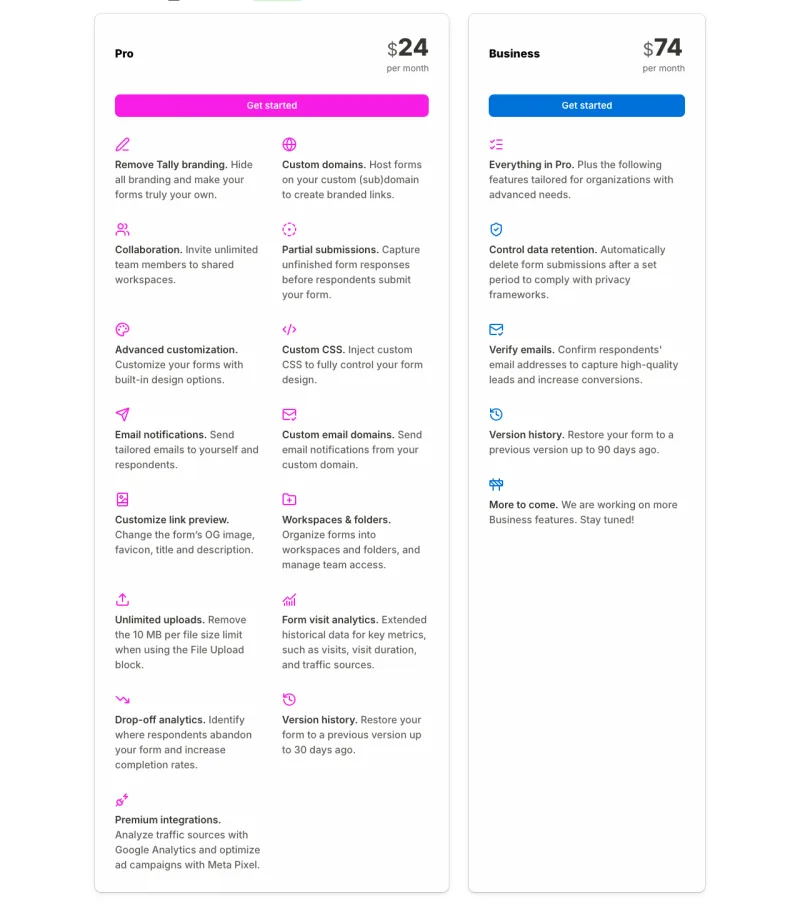
Business, listed at $74 a month with the same unlabelled billing term, adds data retention controls and email verification. Those are compliance features for a team running recurring surveys, not a solo founder’s one-time validation test. Skip it unless you are collecting EU personal data under a retention policy that requires it.
How Does Tally’s Form Builder Actually Work?
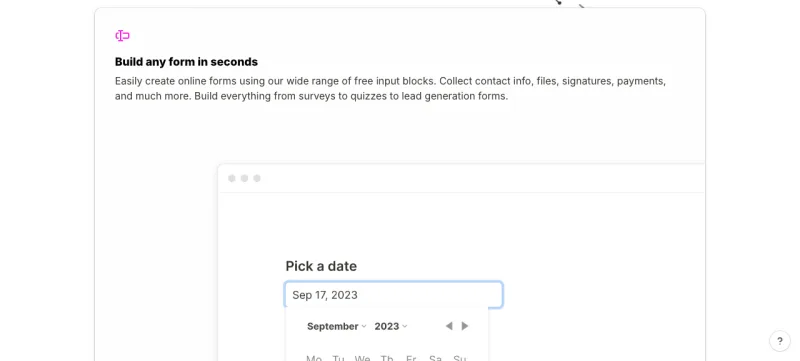
Tally replaces the usual drag-and-drop canvas with a typing interface. You type a question, press enter, and a block menu appears to turn that line into a dropdown, a file upload, a payment field, or a date picker. There is no separate “preview mode” to click into. What you type is close to what gets published.
Tally’s builder works like a plain-text document: typing a line and pressing a slash or enter opens a block picker to convert it into a specific question type, rather than requiring a drag-and-drop canvas.
For a first-time form builder, that lowers the setup time Tally advertises. For someone who has built forms in Typeform or Google Forms before, it takes a few minutes to unlearn the canvas habit and trust the typing flow. Neither is a real blocker. Both get you from blank page to shareable link in well under an hour.
Conditional logic lives in the same block system: you can show or hide a question based on a prior answer, which matters if you are segmenting respondents by, say, whether they currently pay for a competing tool.
What Counts as Fair Use on Tally’s Free Plan?
“Unlimited” is not a promise of no limits. Tally’s fair use policy says most users should stay inside the free plan, and lists examples of extensive usage: consistently collecting around 50,000 submissions a month, around 100 GB of file uploads a month or 500 GB of total storage, or around 50,000 email notifications a month (fetched 16 November 2026). Occasional spikes are fine. If heavy use continues for three or four months, Tally says it will contact you about a custom plan.
A validation survey of 20 to 50 answers sits several orders of magnitude below those examples. The policy matters when the same form becomes a permanent lead-capture form, not during a one-week test.
How Does Tally Compare With Typeform for a Validation Survey?
For a one-time survey, the free plans differ most on volume and payments. The matrix below uses each vendor’s own pricing page, fetched 16 November 2026. Prices and limits change, and the two vendors show prices on different billing terms, so do not compare the Tally and Typeform price rows as like for like. Check both pages before you commit.
| Question | Tally | Typeform |
|---|---|---|
| Free-plan response limit | No fixed number; fair use applies | 10 responses a month across all forms |
| Payment collection | On free, per Tally’s pricing page | Listed as a paid-plan feature in Typeform’s FAQ |
| File uploads | On free, up to 10 MB per file | Listed as a paid-plan feature in Typeform’s FAQ |
| Partial responses | Pro plan (listed at $24 a month, term not labelled) | Paid plans, per Typeform’s FAQ |
| Remove vendor branding | Pro plan | Paid plans (Plus and above, per the plan list) |
| Cheapest paid tier | Pro, listed at $24 a month, billing term not labelled and probably yearly | Basic, 100 responses: $29 monthly or $25 yearly in the comparison table, $39 monthly or $28 yearly in another block |
| What happens at the limit | Fair-use conversation, no hard stop published | Forms go private until next month or you upgrade |
| Data location | EU storage, per Tally | US or EU data centre is an Enterprise option |
The practical difference: ten free Typeform responses will not finish a 20-person survey, and test submissions you make yourself count toward the limit. Tally’s free plan will. Typeform’s paid tiers buy more polished theming and reporting, which is worth it for an established brand, not for a first demand test.
One caution about what this comparison shows. A form answer is a stated opinion. The queries that bring people to a Tally review show interest in a form builder, not proof that anyone will pay for your idea. Treat survey answers as a reason to run a real commitment test, not as demand.
Can You Use Tally Inside a Lovable App?
If you are building a landing page or prototype in Lovable, Tally’s Lovable guide says embedding a Tally form is free, with unlimited submissions. You can paste the Tally form URL into Lovable’s chat and ask it to embed the form, or paste the embed code yourself.
There is a second route. Tally has an MCP server, free on all Tally plans, that lets Lovable’s agent create and edit forms from chat using your Tally API key. The catch is that connecting a custom MCP server in Lovable requires a paid Lovable plan, per the same guide. The plain embed route needs no paid Lovable plan.
This is a build-time convenience. For a pre-build test, a shared Tally link is simpler and does not need an app at all.
Who Is Tally Not a Good Fit For?
Tally’s gaps show up in two places: polish and extended analytics.
Branding stays on every free form, and there is no custom domain until Pro. If you are validating an idea under an existing brand with design standards your audience already recognizes, a visibly “powered by Tally” footer is a small but real credibility cost. Typeform’s paid theming is more mature here.
Extended form-visit analytics, drop-off analytics beyond the basic view, and version history also sit on Pro. A one-time validation survey rarely needs any of those. A recurring lead-generation form on your actual website probably does.
Tally is a weaker fit for teams that need brand-matched custom domains, extended visit analytics, or multi-person collaboration on day one. Those sit behind the Pro plan (listed at $24 a month), not the free tier.
Pros and Cons
What you gain:
- A genuinely unlimited free tier. No response cap, no monthly reset, no “upgrade to collect more than 100 responses” wall mid-survey.
- Payment collection and e-signatures on free, which covers a pre-sale validation test without a second tool.
- A typing-first builder that gets a first form published in minutes, with no account required to try it.
- EU-hosted, GDPR-compliant data storage by default, which matters for privacy-sensitive or EU-facing ideas.
What you give up:
- Tally branding and no custom domain until the Pro plan (listed at $24 a month).
- No partial-submission data on free, so you cannot see where respondents abandon the form before they finish.
- Extended analytics, version history, and team collaboration are Pro or Business features, not free ones.
- “Unlimited” is bounded by a fair-use policy with example thresholds, not a contractual cap you can plan against.
Verdict: Who Should Use Tally?
Use Tally if you are running a first validation survey and want the widest free feature set of any option in this hub: no response cap, payment collection, and conditional logic, all before you have decided the idea is worth a dollar of tooling spend. It is the default pick for Kai-style indie founders testing three ideas before they build any of them, and for Nina- or Marcus-style creators testing a course or product concept against their existing audience.
Skip Tally, at least on free, if your survey needs partial-submission data to diagnose a weak question, or if you are testing under an existing brand where a visible “powered by Tally” footer would undercut the credibility you are trying to project.
Either way, a survey only tells you whether a problem resonates. It does not tell you whether someone will pay. Pair whatever you build in Tally with a handful of real conversations using our customer interview scripts before you treat the results as a green light. If you want the fuller field comparison against Typeform, Jotform, and Formbricks, see 5 Typeform Alternatives for Validating a Business Idea.
Frequently Asked Questions
Is Tally really free?
Yes. Tally’s free plan includes unlimited forms and unlimited submissions, plus conditional logic, payment collection, e-signatures, and file uploads, within its published fair-use guidelines, per Tally’s own pricing page. No credit card is required to start.
What does Tally’s Pro plan unlock that the free plan does not?
Pro, listed at $24 a month with no billing term labelled (probably yearly), removes Tally branding, adds custom domains, and enables partial submissions, which capture responses from people who started the form but never clicked submit. It also raises the file upload limit above the free tier’s 10 MB cap.
Is Tally better than Typeform for a validation survey?
For a one-time validation test, yes, on cost. Tally’s free plan has no fixed response cap, while Typeform’s free plan allows 10 responses a month and its Basic plan allows 100, priced at $29 monthly or $25 yearly in one table and $39 monthly or $28 yearly in another block on the same page (fetched 16 November 2026). Tally’s Pro price is not labelled by term, so compare the two only after checking each checkout. Typeform’s theming is more mature, which matters more for an established brand’s lead-gen forms.
Does Tally collect payments on the free plan?
Yes. Payment collection is included on Tally’s free tier, which lets a pre-sale validation question, “would you pay to reserve a spot,” end in an actual charge instead of just an opinion, without needing a separate checkout tool.
Is my data safe with Tally?
Tally is based in the EU and stores form data in Europe, encrypted both in transit and at rest, and states GDPR compliance on its pricing page. Business-tier customers can additionally set automatic data-retention periods for compliance needs beyond the default storage.
Keep Reading
What to Do Next
Choose the path that fits where you are right now.
Get the 7-Day Idea Test (Free)
Download the free 7-Day Idea Test. One task per day. Four evidence signals. One clear go, wait, or kill result — before you spend months building the wrong thing.
Send Me the PlaybookStart Reading
Read the step-by-step setup guide for your platform.